How to Make AI Videos with Free Tools in 2026
Introduction Artificial intelligence is changing content creation rapidly. Nowadays, many beginners, students, freelancers, and YouTubers are using free AI tools to create professional videos without expensive software or advanced editing skills. As video content continues growing across social media platforms, AI video creation has become one of the easiest ways to produce engaging content online….
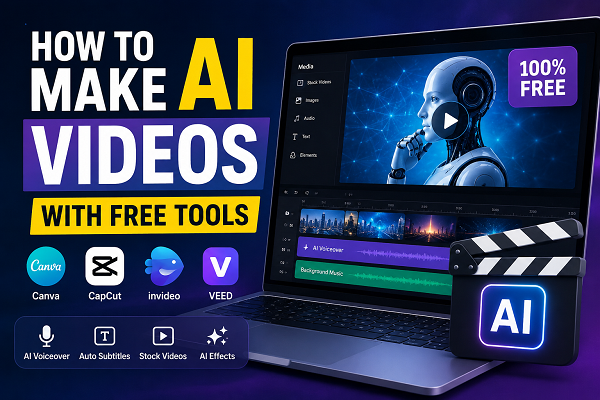
Table of Contents
ToggleIntroduction
Artificial intelligence is changing content creation rapidly. Nowadays, many beginners, students, freelancers, and YouTubers are using free AI tools to create professional videos without expensive software or advanced editing skills.
As video content continues growing across social media platforms, AI video creation has become one of the easiest ways to produce engaging content online.
Previously, video editing required professional cameras, paid software, and technical knowledge. However, modern AI tools now allow users to generate scripts, voiceovers, subtitles, animations, and complete videos automatically.
Because of this advancement, anyone can start creating AI videos from home using free platforms. Moreover, businesses and content creators constantly need video content for marketing and audience engagement.
Consequently, learning how to make AI videos with free tools can help beginners build useful digital skills and online earning opportunities.
Additionally, AI video creation is becoming popular among students, freelancers, and social media creators worldwide. Meanwhile, many businesses are also using AI-generated videos for promotions and audience engagement.

What is AI Video Creation?
AI video creation is the process of generating videos using artificial intelligence software and automation tools. Instead of editing everything manually, AI platforms help users create videos quickly through automated features.
For example, AI video tools can:
- Generate scripts
- Create AI voiceovers
- Add subtitles automatically
- Convert text into videos
- Create animations and avatars
- Edit videos professionally
As a result, even beginners can produce high-quality videos without advanced editing experience.
Similarly, AI automation tools simplify complex editing tasks for beginners. Therefore, users can create professional-quality videos more efficiently.
Why Free AI Video Tools Are Popular?
Free AI video tools are becoming increasingly popular because they save time, reduce costs, and simplify video editing for beginners.
Main Reasons Behind Popularity for Make AI Videos with Free Tools
- Firstly, free tools reduce editing expenses significantly.
- Secondly, beginners can learn video creation without investment.
- Moreover, AI tools speed up content production efficiently.
- In addition, automated features make editing much easier.
- Ultimately, creators can produce videos regularly for social media and YouTube.
Because of these advantages, AI video creation has become a growing digital skill worldwide.
Best Free AI Video Tools
Several free AI platforms are available for beginners and content creators.
Popular Free AI Video Tools
- Canva
- CapCut
- InVideo
- Pictory
- Runway
- VEED
Additionally, most of these tools provide free templates, AI voiceovers, subtitles, and drag-and-drop editing features.
Besides this, free AI platforms regularly introduce new editing features and automation tools. As a result, beginners can improve video quality without advanced technical skills.
Step-by-Step Guide to Make AI Videos with Free Tools
Step 1: Choose One Free AI Tool
First of all, select one beginner-friendly AI video platform such as Canva or CapCut.
Meanwhile, beginners should focus on learning one tool properly before trying multiple platforms.
Furthermore, creators should compare features, templates, and export quality before selecting a platform. In this way, beginners can choose tools according to their content needs.
Step 2: Select a Video Topic and Make AI Videos with Free Tools
Next, choose a content niche according to your interests and audience.
Popular Video Niches
- Technology
- Education
- Motivation
- Health
- Business
- AI tutorials
- Online earning
Because niche-focused content performs better online, creators should stay consistent in one category.
Likewise, choosing a trending niche can improve audience reach and engagement significantly. Consequently, creators may grow faster on social media platforms.
Step 3: Create a Script for Make AI Videos with Free Tools
Afterward, write a short and engaging script for your video. Alternatively, many AI tools can generate scripts automatically.
Script Writing Tips
- Keep sentences simple
- Use short paragraphs
- Add engaging hooks
- Focus on one topic
- End with a call to action
Consequently, viewers can understand the content more easily.
In addition, clear scripting helps viewers understand the topic more effectively. Therefore, creators should organize content properly before recording voiceovers.
Step 4: Generate AI Voiceover
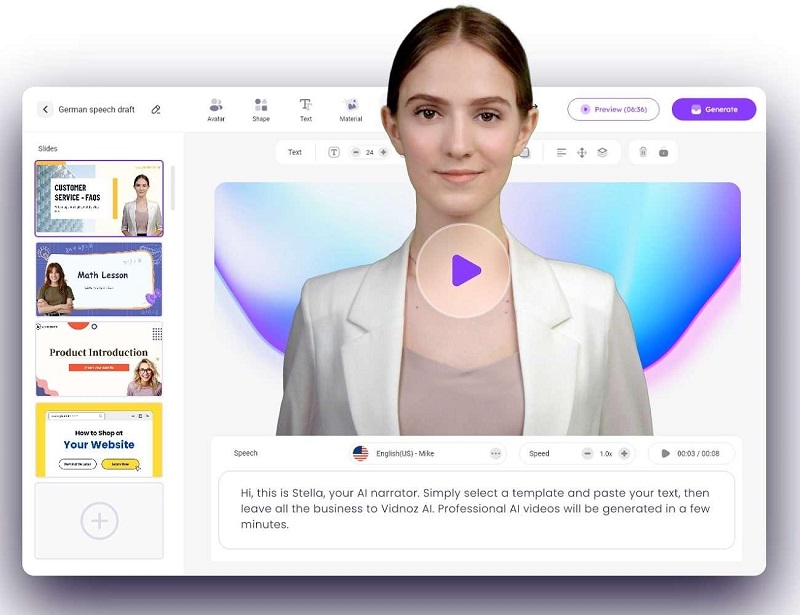
Many free AI tools allow creators to add realistic AI voiceovers automatically.
Free AI Voiceover Tools
- CapCut
- Canva
- VEED
Furthermore, creators can choose different languages, tones, and voice styles according to their audience.
Meanwhile, realistic AI voiceovers improve audience attention and video quality considerably. Because of this, many creators prefer automated voice generation tools.
Step 5: Add Images and Video Clips
Then, upload stock footage, animations, or free images into your video editor.
Sources for Free Media
- Free stock footage websites
- AI-generated visuals
- Canva templates
- Copyright-free images
At the same time, creators should avoid copyrighted content without permission.
Furthermore, high-quality visuals make videos more professional and engaging. On the other hand, poor-quality images may reduce viewer interest quickly.
Step 6: Add Subtitles and Effects
Subtitles improve audience retention and make videos easier to understand.
Important Editing Features
- Transitions
- Text overlays
- Background music
- Subtitles
- Animations
Moreover, professional editing can improve watch time and viewer engagement significantly.
Similarly, subtitles help viewers understand videos even without sound. As a consequence, audience retention and watch time may increase significantly.
Step 7: Export and Upload Video
Finally, export your AI video and upload it on platforms like:
- YouTube
- TikTok
Over time, consistent uploads can help creators grow audiences and improve content performance.
Types of AI Videos You Can Make
AI tools allow creators to produce different video styles for multiple industries.
Moreover, AI video tools support multiple content styles for different industries and audiences. Consequently, creators can experiment with various video formats easily.
Educational Videos
Teachers and students create tutorials and explainers using AI tools.
YouTube Automation Videos
Many creators build faceless YouTube channels using AI voiceovers and stock footage.
Social Media Reels
Short-form videos for Instagram Reels and TikTok perform extremely well online.
Marketing Videos
Businesses use AI-generated videos for promotions and advertising campaigns.
Product Review Videos
Affiliate marketers create AI videos for product reviews and software tutorials.
Benefits of Making AI Videos with Free Tools
Main Benefits
- Undoubtedly, free tools reduce production costs significantly.
- Moreover, AI editing saves valuable time for creators.
- At the same time, beginners can learn video creation easily.
- Consequently, creators can upload content more consistently.
- Above all, AI tools make professional editing accessible to everyone.
Additionally, creators can work from home without expensive equipment.
Likewise, remote work opportunities allow creators to work independently from home. Therefore, AI video creation is becoming attractive for beginners and freelancers.
Common Mistakes to Avoid
Many beginners make mistakes while learning AI video creation.
Mistakes to Avoid
- Firstly, avoid uploading low-quality videos regularly.
- Furthermore, using copyrighted content may create monetization issues.
- Likewise, inconsistent posting can reduce audience growth.
- In contrast, original content performs much better online.
- Most importantly, creators should focus on long-term improvement instead of instant success.
Tips for Better AI Videos
Helpful Tips Regarding Make AI Videos with Free Tools
- To begin with, focus on one niche consistently.
- Afterward, upload videos regularly for better engagement.
- Simultaneously, improve editing quality and storytelling.
- Moreover, use subtitles in every video whenever possible.
- Eventually, study trending content to improve growth opportunities.
Most importantly, consistency and creativity are essential for long-term success.
Can You Earn Money with AI Videos?
Yes, creators can earn money using AI-generated videos through different methods.
Popular Earning Methods Regarding Make AI Videos with Free Tools
- YouTube monetization
- Freelancing
- Affiliate marketing
- Sponsored content
- Social media management
Consequently, AI video creation is becoming a growing online earning skill in 2026.
Additionally, many creators combine multiple earning methods to increase monthly income. In the long run, consistent content creation can build stable earning opportunities.
Future of AI Video Creation
The future of AI video creation looks extremely promising. As artificial intelligence technology continues improving, video production will become faster, smarter, and more advanced.
Furthermore, businesses are increasing investments in AI marketing and automated content creation. Therefore, the demand for AI video creators is expected to grow significantly in coming years.
Eventually, AI-generated content may become one of the biggest digital industries worldwide.
At the same time, AI technology is improving video editing speed and automation rapidly. Because of these developments, content creation may become even more accessible in the future.
Conclusion for Make AI Videos with Free Tools
Learning how to make AI videos with free tools is becoming an important digital skill for students, freelancers, and content creators. Through modern AI platforms, beginners can now create professional videos without expensive equipment or advanced editing experience.
Moreover, free AI tools allow creators to produce educational videos, social media content, marketing videos, and YouTube automation videos efficiently. Although success requires consistency and creativity, regular practice can gradually improve editing quality and audience growth.
Most importantly, AI video creation offers exciting future opportunities in freelancing, content creation, and online earning. Therefore, individuals who start learning today can build valuable digital skills and long-term career opportunities.
Overall, free AI video tools provide excellent opportunities for learning digital content creation. Ultimately, creators who remain consistent and continue practicing can improve their skills and online earning potential significantly.
Disclaimer for Make AI Videos with Free Tools
The information provided in this article is for educational purposes only. Features and limitations of free AI tools may change over time depending on platform policies and updates.
🔗 Internal Links
- https://readsinfo.com/earn-online-money-pakistan-saylani/
- https://readsinfo.com/how-to-earn-money-from-amazon-in-2026/
- https://readsinfo.com/category/artificial-intelligence/
- https://readsinfo.com/category/technology/
- https://readsinfo.com/category/online-earning/
- https://readsinfo.com/category/business-finance/
- https://readsinfo.com/category/jobs-career/
🌐 Outbound Links
- https://www.canva.com/
- https://www.capcut.com/
- https://openai.com/
- https://invideo.io/
- https://runwayml.com/
- https://www.veed.io/
- https://www.youtube.com/
- https://www.tiktok.com/
❓ FAQ Section
1. What are AI video tools?
AI video tools are software platforms that use artificial intelligence to help users create, edit, and generate videos automatically. These tools can create subtitles, voiceovers, animations, and video effects quickly.
2. Can beginners make AI videos with free tools?
Yes, beginners can easily make AI videos with free tools like Canva and CapCut. Additionally, most platforms provide beginner-friendly templates and automated editing features.
3. Which free AI video tools are best in 2026?
Popular free AI video tools include:
- Canva
- CapCut
- InVideo
- VEED
4. Can I make AI videos without showing my face?
Yes, many creators use AI voiceovers, stock footage, subtitles, and AI avatars to create faceless videos. Therefore, showing your face is not necessary.
5. Are free AI video tools safe to use?
Most popular AI video tools are safe when downloaded or accessed from official websites. However, users should avoid unofficial or suspicious platforms.
6. Can students learn AI video creation?
Yes, students can learn AI video creation because many tools are beginner-friendly and available online for free.
7. Can I earn money with AI videos?
Yes, creators can earn money through:
- YouTube monetization
- Freelancing
- Affiliate marketing
- Sponsored content
- Social media management
Consequently, AI video creation has become a growing online earning skill.
8. What skills are needed for AI video creation?
Important skills include:
- Creativity
- Basic video editing
- Script writing
- Communication
- Social media understanding
Moreover, learning storytelling can improve video engagement significantly.
9. Which platforms are best for uploading AI videos?
Popular platforms include:
- YouTube
- TikTok
10. Is AI video creation the future of content creation?
Yes, AI video creation is growing rapidly because businesses, marketers, and creators need faster and more affordable video production solutions. Furthermore, AI technology is expected to improve even more in the future.

Gul Fahad is the founder of Readsinfo and a content creator focused on Artificial Intelligence, Technology, Online Earning, and Education. He shares practical guides, digital learning resources, and real-world insights to help readers develop valuable skills and stay updated with modern trends.