
How to Fix Android Phone Overheating Issues: 15 Proven Solutions
Introview An Android phone overheating can be frustrating, especially when it interrupts gaming, video calls, charging, or everyday tasks. Although it’s normal for smartphones to become slightly warm during heavy use, excessive heat may indicate an underlying problem that requires attention. Fortunately, most overheating issues can be resolved without replacing your phone. In many cases,…
Introview
An Android phone overheating can be frustrating, especially when it interrupts gaming, video calls, charging, or everyday tasks. Although it’s normal for smartphones to become slightly warm during heavy use, excessive heat may indicate an underlying problem that requires attention.
Fortunately, most overheating issues can be resolved without replacing your phone. In many cases, simple changes such as closing background apps, reducing screen brightness, or updating your device can make a noticeable difference.
In this guide, you’ll learn how to fix Android phone overheating using practical, beginner-friendly solutions. Additionally, you’ll discover the most common causes of overheating, ways to prevent it, and signs that indicate when professional repair may be necessary.
Whether your phone becomes hot while charging, gaming, or simply sitting idle, this step-by-step guide will help you identify the problem and keep your device running safely.
What’s Covered in This Guide
| Section | Details |
|---|---|
| Quick Overview | Introduction to phone overheating |
| Signs of Overheating | Warning symptoms to watch for |
| Common Causes | Why Android phones become hot |
| 15 Proven Fixes | Step-by-step troubleshooting |
| Prevention Tips | Keep your phone cool |
| Temperature Guide | Safe vs unsafe temperatures |
| FAQs | Common questions answered |
| Conclusion | Final recommendations |
Signs Your Android Phone Is Overheating
Before trying to fix the problem, it’s important to recognize the warning signs. While a phone may feel slightly warm during normal use, excessive heat should never be ignored.
Common signs of Android phone overheating include:
- The back of the phone feels unusually hot.
- Apps become slow or freeze.
- Battery drains much faster than normal.
- The screen automatically dims.
- Charging becomes slower than usual.
- Performance decreases during gaming.
- Warning messages about high temperature appear.
- The phone unexpectedly restarts or shuts down.
Furthermore, some Android devices automatically limit performance to protect internal components from heat damage. As a result, your phone may feel slower until it cools down.
Common Causes of Android Phone Overheating
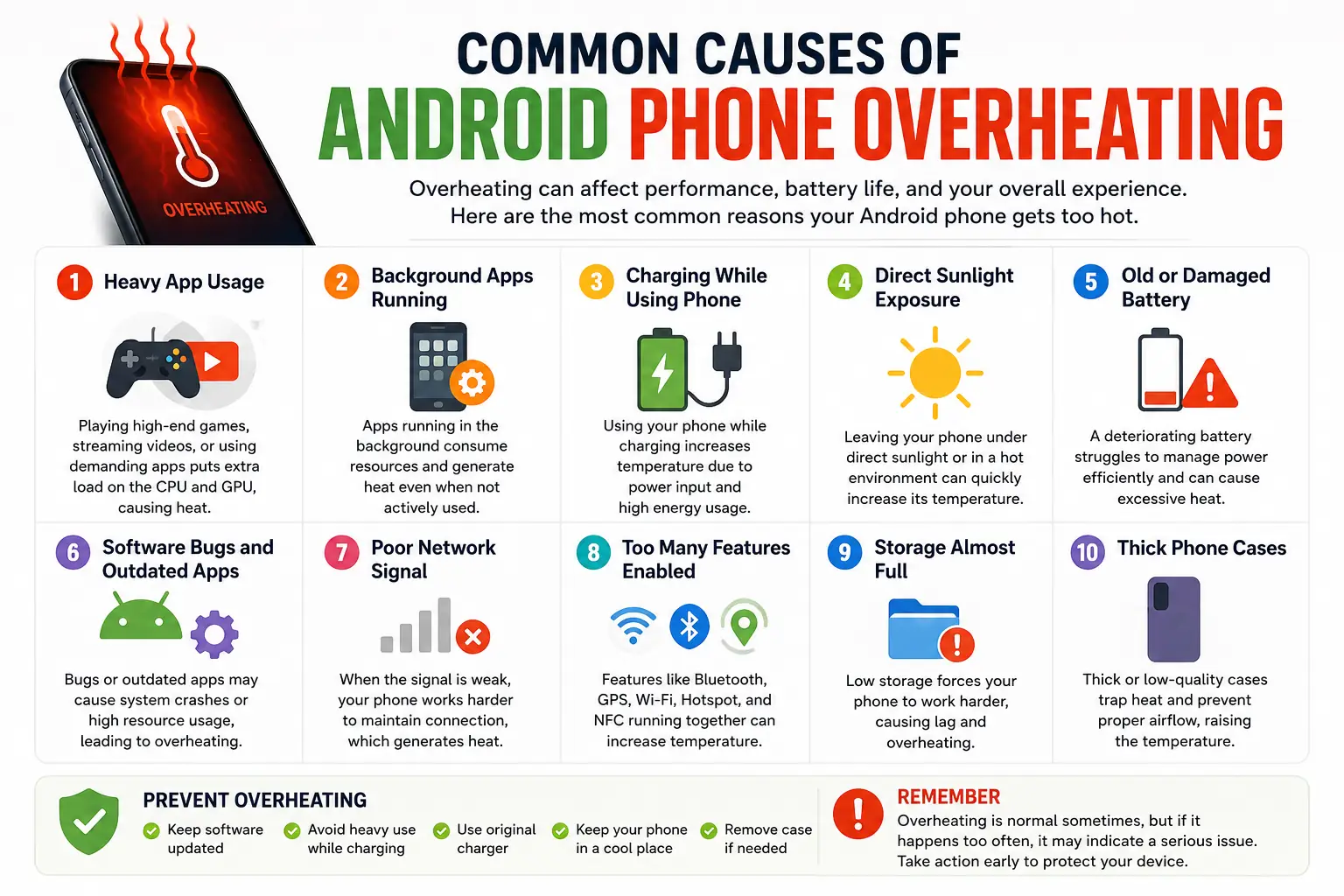
Understanding the cause is the first step toward solving the problem. Although overheating may seem serious, it’s often caused by everyday habits that are easy to correct.
Let’s look at the most common reasons why an Android phone overheating issue occurs.
Running Too Many Apps causing android phone overheating
Running several applications at the same time forces the processor to work harder than usual.
For example, streaming music while downloading files and browsing social media increases CPU usage significantly.
Moreover, some apps continue running in the background even after you’ve closed them. Consequently, they consume processing power, memory, and battery life, causing the phone to generate extra heat.
Therefore, regularly closing unnecessary background apps can help reduce device temperature.
Gaming for Long Periods
Mobile games are more demanding than most everyday applications.
High-quality graphics, online multiplayer modes, and fast frame rates require continuous processing power.
As a result, the CPU and GPU work at maximum capacity, generating additional heat.
Furthermore, playing while charging your phone can increase the temperature even more. Therefore, it’s a good idea to take short breaks during long gaming sessions.
High Screen Brightness
Many users keep their screen brightness at maximum throughout the day.
Although a brighter display improves visibility outdoors, it also increases battery consumption and heat production.
Instead, enable Adaptive Brightness or manually reduce brightness whenever possible.
Consequently, your phone stays cooler while also extending battery life.
Hot Weather and Direct Sunlight doing android phone overheating
Environmental temperature has a major impact on smartphone performance.
Using your phone under direct sunlight or leaving it inside a parked car can quickly raise its internal temperature.
Moreover, high outdoor temperatures make it harder for the phone to cool itself naturally.
Therefore, always keep your device in a shaded or cool place whenever possible.
Using a Faulty or Low-Quality Charger
Not every charger delivers power safely.
Cheap or damaged chargers may supply unstable voltage, causing the battery to heat excessively during charging.
Furthermore, non-certified charging accessories may reduce battery health over time.
For this reason, it’s always recommended to use the original charger or a certified replacement from a trusted manufacturer.
Old or Damaged Battery
As smartphone batteries age, they become less efficient.
Consequently, older batteries generate more heat during charging and heavy usage.
You may also notice:
- Faster battery drain
- Unexpected shutdowns
- Longer charging times
- Reduced overall performance
If your phone is several years old and overheating has become frequent, replacing the battery may solve the problem.
Software Bugs and Outdated Apps
Sometimes, overheating is caused by software rather than hardware.
For instance, an app with a programming bug may continue running in the background and consume excessive CPU resources.
Similarly, outdated Android software can introduce performance issues that increase device temperature.
Therefore, keeping both your operating system and installed apps updated is an easy way to improve stability and reduce overheating.
Malware or Harmful Applications getting android phone overheating
Although it’s less common, malware can also cause an Android phone overheating problem.
Malicious apps often run hidden processes that continuously use the processor and internet connection without your knowledge.
As a result, the phone becomes hotter, slower, and drains its battery more quickly.
Therefore, avoid downloading apps from unknown sources and regularly scan your device using a trusted mobile security application.
How to Fix Android Phone Overheating Issues
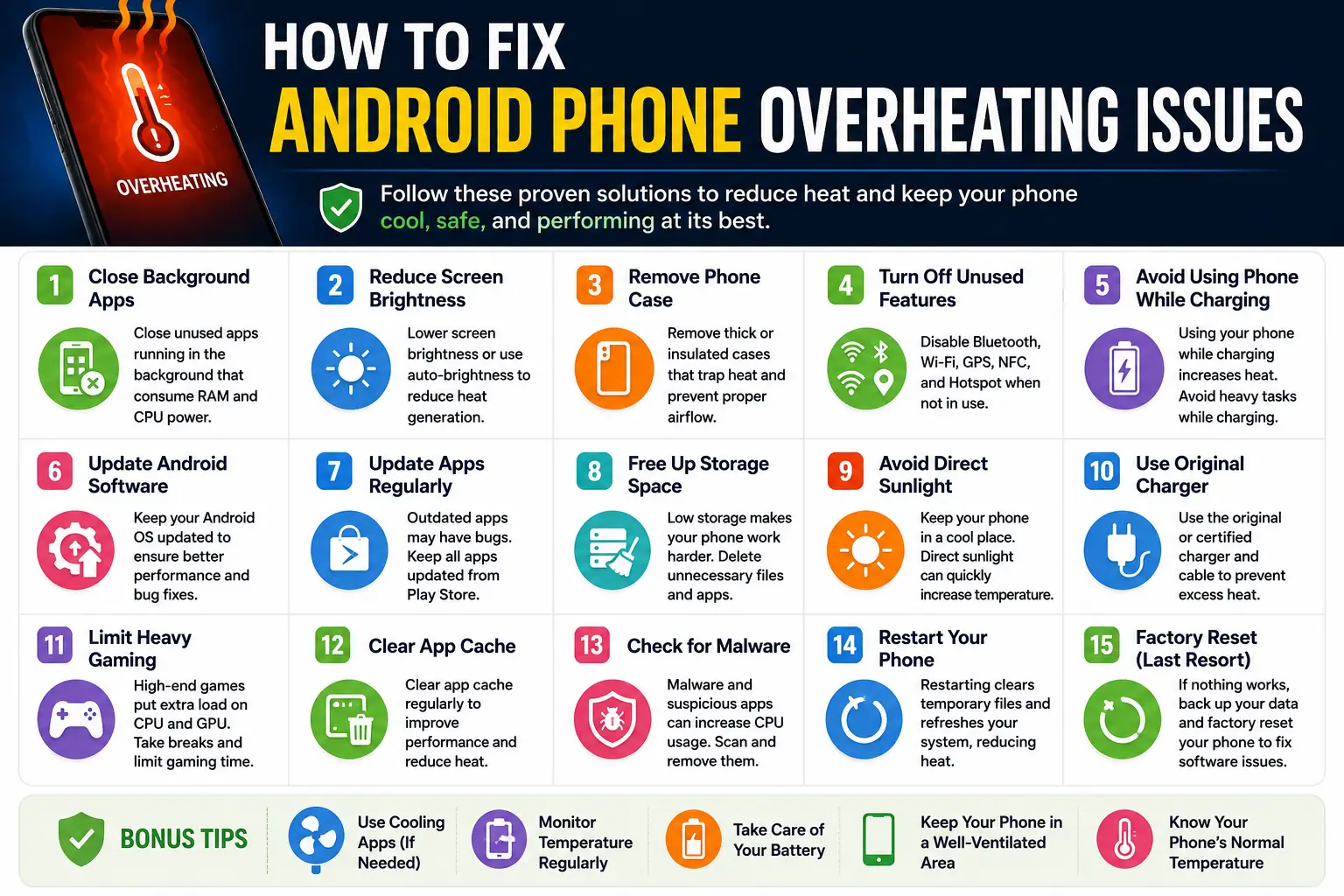
Once you’ve identified the possible cause, the next step is applying the right solution. Fortunately, most Android phone overheating problems can be fixed without visiting a repair center. In many cases, a few simple adjustments are enough to lower your phone’s temperature and improve its overall performance.
Below are some of the most effective solutions you can try.
Close Background Apps
One of the easiest ways to reduce overheating is by closing apps running in the background.
Although many applications appear to be closed, they often continue using your phone’s processor, memory, and battery. Consequently, your device generates unnecessary heat even when you’re not actively using those apps.
To fix this issue:
- Open the Recent Apps screen.
- Close apps you no longer need.
- Avoid running multiple heavy applications at the same time.
Furthermore, restarting your phone after closing background apps can free additional system resources and help the device cool down more quickly.
Reduce Screen Brightness
Your phone’s display is one of the biggest sources of heat and battery consumption.
If the brightness remains at 100% for extended periods, the device works harder and produces more heat. Therefore, lowering the brightness can noticeably reduce the temperature.
For even better results:
- Enable Adaptive Brightness.
- Reduce screen timeout.
- Use Dark Mode whenever possible.
As a result, both battery life and overall performance may improve.
Remove the Phone Case
Although phone cases protect your device from accidental damage, some thick cases can trap heat inside the phone.
For example, heavy rubber or waterproof cases often reduce airflow during charging or gaming.
Therefore, if your phone becomes unusually hot, remove the case temporarily and allow it to cool naturally.
However, avoid placing the phone inside a refrigerator or freezer, as sudden temperature changes can damage internal components.
Turn Off Unused Features
Many Android features continue running even when they’re not needed.
For instance:
- Bluetooth
- GPS
- Mobile Hotspot
- NFC
- Wi-Fi scanning
If you are not using these features, turning them off reduces background activity and lowers processor usage.
Consequently, your phone consumes less power and generates less heat.
Restart Your Phone
Sometimes the simplest solution is also the most effective.
Restarting your phone closes temporary background processes, clears memory, and refreshes the operating system.
Moreover, if an app has become stuck or is consuming excessive resources, a restart often resolves the issue immediately.
Therefore, if your device suddenly starts overheating, restart it before trying more advanced troubleshooting methods.
Update Android Software
Outdated software may contain bugs that affect system performance and battery efficiency.
Fortunately, manufacturers regularly release software updates that improve stability, optimize performance, and fix overheating-related issues.
To check for updates:
- Open Settings.
- Tap System or Software Update.
- Download and install any available updates.
Furthermore, updating your apps through the Google Play Store helps eliminate bugs that could contribute to excessive heat.
As a result, your phone remains more secure, stable, and efficient.
Charge Your Phone Correctly
Improper charging habits are another common reason for Android phone overheating.
Whenever possible:
- Use the original charger.
- Avoid cheap or uncertified charging accessories.
- Charge your phone in a cool environment.
- Unplug the charger after reaching 100%.
In addition, avoid using your phone for gaming or video streaming while it’s charging. Since charging already produces heat, running demanding apps at the same time places extra stress on the battery.
Consequently, following proper charging practices helps extend battery life while reducing overheating.
Avoid Direct Sunlight
High outdoor temperatures can quickly increase your phone’s internal temperature.
For example, leaving your phone on a car dashboard or using it under direct sunlight for long periods may cause overheating warnings.
Therefore, whenever possible:
- Keep your phone in the shade.
- Avoid leaving it inside parked vehicles.
- Store it in a cool, dry place.
As a result, your device will maintain a safer operating temperature even during hot weather.
Scan for Malware
Although many users overlook this possibility, malicious apps can also cause overheating.
Some harmful applications continue running hidden processes that consume processing power, battery, and mobile data.
Therefore, regularly scan your phone using a trusted mobile security app.
Additionally:
- Download apps only from the Google Play Store.
- Remove suspicious or unused apps.
- Review app permissions regularly.
Consequently, your device remains safer while also running more efficiently.
Free Up Storage Space
A nearly full storage drive can slow your phone and increase system workload.
Therefore, delete unnecessary files such as:
- Duplicate photos
- Old videos
- Unused applications
- Large downloads
- Cached files
Furthermore, moving photos and videos to cloud storage can free additional space.
As a result, Android has more room to operate efficiently, reducing lag and helping the phone stay cooler.
Reset Your Phone (Last Resort)
If you’ve tried every solution and your Android phone overheating issue still persists, a factory reset may help.
However, this should only be considered after backing up all important data.
Before resetting:
- Back up contacts.
- Save photos and videos.
- Sync files with Google Drive.
- Export important documents.
Next, go to:
Settings → System → Reset → Factory Data Reset
After the reset is complete, install only trusted apps and monitor your phone’s temperature for a few days.
Ultimately, if overheating continues even after a factory reset, the problem is likely hardware-related. In that case, contacting the manufacturer’s authorized service center is the safest option.
How to Prevent Android Phone Overheating
Preventing your phone from overheating is much easier than fixing the problem after it occurs. By following a few simple habits, you can reduce unnecessary heat, improve battery life, and extend the overall lifespan of your device.
Moreover, good maintenance helps your phone perform more efficiently during everyday tasks as well as demanding activities like gaming or video recording.
Follow Safe Charging Practices to avoid android phone overheating
Charging habits have a significant impact on your phone’s temperature.
To keep your device cool while charging:
- Use the original or a certified charger.
- Avoid charging your phone under a pillow or blanket.
- Charge your phone in a cool, well-ventilated place.
- Remove thick phone cases if the device becomes too warm.
- Unplug the charger once the battery is fully charged.
Furthermore, avoid using heavy apps while charging because this creates additional heat. As a result, your battery remains healthier over time.
Take Care of Your Battery
A healthy battery helps maintain normal operating temperatures.
Therefore, try these battery care tips:
- Avoid letting the battery reach 0% regularly.
- Recharge before the battery becomes critically low.
- Keep the battery level between 20% and 80% whenever possible.
- Avoid exposing your phone to extreme temperatures.
Consequently, your battery will experience less stress and maintain better long-term performance.
Reduce Heavy Gaming Sessions
Gaming is one of the most demanding tasks for any smartphone.
Although modern Android phones are designed to handle demanding games, continuous gaming for several hours can significantly increase the device’s temperature.
Instead:
- Take short breaks every 30–60 minutes.
- Lower graphics settings if supported.
- Close background apps before launching games.
- Avoid gaming while charging.
As a result, your phone stays cooler and performs more consistently.
Keep Android and Apps Updated
Software updates are more important than many users realize.
Manufacturers frequently release updates that improve battery efficiency, fix software bugs, and optimize system performance.
Similarly, app developers regularly update their applications to reduce crashes and improve resource management.
Therefore, keeping both Android and your installed apps updated helps minimize overheating problems.
Android Phone Temperature Guide
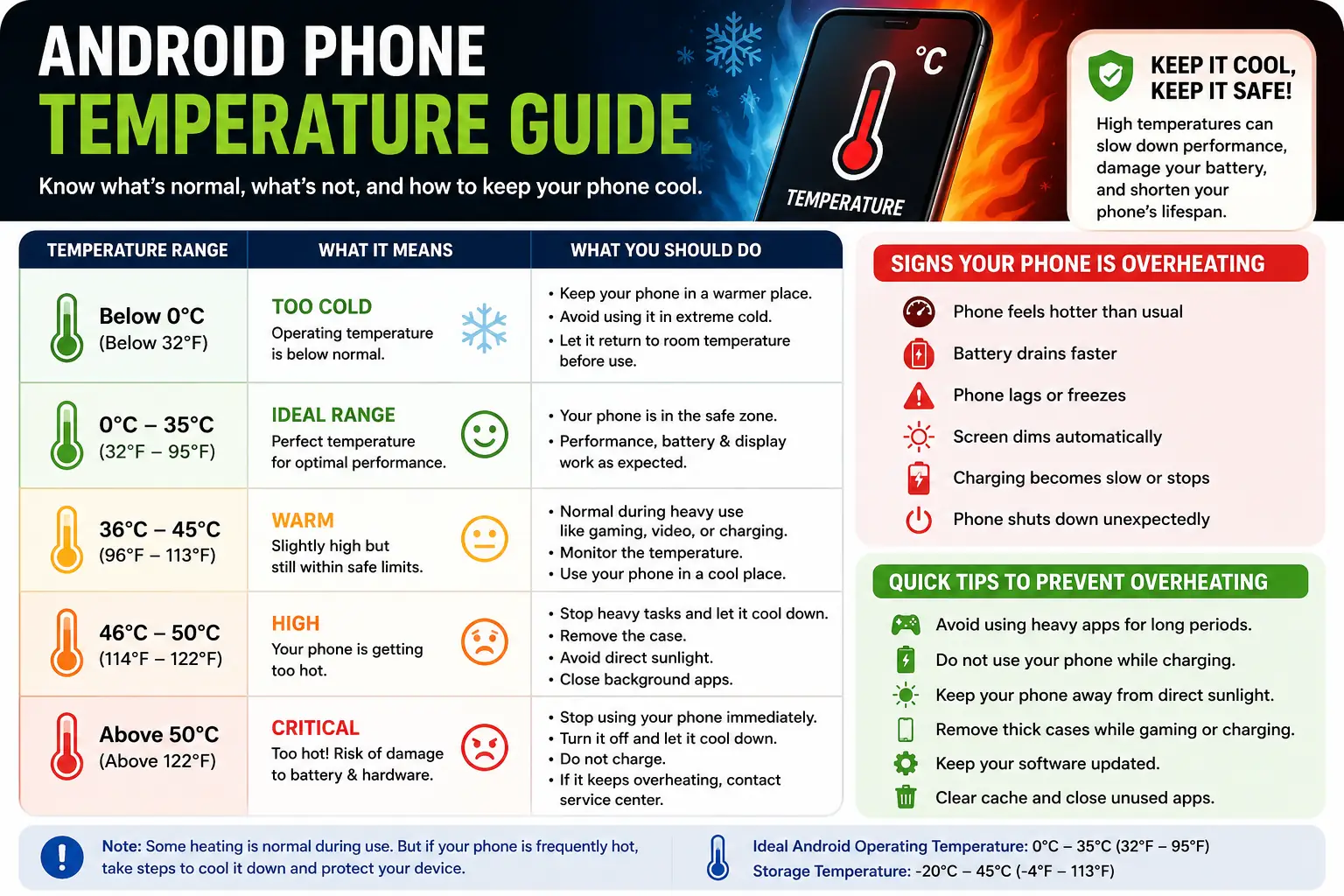
Understanding normal phone temperatures can help you determine whether your device is operating safely or requires attention.
| Phone Temperature | Status | Recommended Action |
|---|---|---|
| 25°C–35°C | Normal | No action required |
| 36°C–40°C | Slightly Warm | Continue using normally |
| 41°C–45°C | Warm | Reduce heavy usage and allow the phone to cool |
| Above 45°C | Overheating | Stop using the phone until it cools down |
Although these temperatures may vary slightly between manufacturers, consistently exceeding safe limits should not be ignored.
When Should You Worry About Android Phone Overheating?
Occasional warmth during charging or gaming is completely normal.
However, overheating may indicate a serious issue if:
- The phone becomes extremely hot without heavy use.
- Overheating occurs every day.
- The battery begins swelling.
- The device shuts down repeatedly.
- You notice a burning smell.
- Charging stops because of temperature warnings.
Furthermore, continuing to use an excessively hot phone could damage internal components.
Therefore, if these warning signs appear regularly, it’s best to contact an authorized repair center as soon as possible.
Common Myths About Phone Overheating
Many misconceptions about smartphone overheating continue to circulate online. Understanding the facts can help you protect your device more effectively.
| Myth | Reality |
|---|---|
| Closing every app always cools the phone instantly. | Only resource-intensive apps usually make a noticeable difference. |
| Fast charging always damages a phone. | Certified fast chargers include safety systems to manage heat. |
| Putting a hot phone in the refrigerator cools it safely. | Sudden temperature changes can damage the phone and create moisture inside the device. |
| Every warm phone is overheating. | Slight warmth during charging or gaming is completely normal. |
| Antivirus apps always fix overheating. | Overheating is often caused by hardware, software, or usage habits rather than malware alone. |
Consequently, following trusted advice is much safer than relying on common myths.
Conclusion
Experiencing Android phone overheating can be frustrating, but in most cases, the problem is easy to fix. Simple steps such as closing unnecessary apps, reducing screen brightness, updating Android, and using the correct charger can significantly lower your phone’s temperature.
Furthermore, following healthy charging habits, managing storage, and avoiding prolonged exposure to direct sunlight will help prevent future overheating issues. As a result, your device will perform more efficiently and your battery will last longer.
Ultimately, if your Android phone continues to overheat even after trying these solutions, the issue may be hardware-related. In that situation, visiting an authorized service center is the safest option. By taking preventive measures and maintaining your phone regularly, you can enjoy better performance, improved battery health, and a longer device lifespan.
Related Articles
- Mobile Battery Health Guide: How to Extend Battery Life
- How to Connect Mobile Screen to TV: Easy Step-by-Step Guide
- Nokia Secret Codes Explained: Hidden Features & Useful Functions
- Top WhatsApp Hidden Features Most Users Never Use
- How to Use FL Studio for Beginners: Step-by-Step Guide
Helpful Resources
Caution for android phone overheating
This guide is for educational and informational purposes only. Android phone overheating can occur due to software, hardware, battery condition, or environmental factors. If your device overheats frequently, displays safety warnings, or shows signs of battery swelling, stop using it immediately and contact your device manufacturer’s authorized service center for professional assistance.
Frequently Asked Questions
Is It Normal for an Android Phone to Get Warm?
Yes. Most Android phones become slightly warm during gaming, charging, video recording, or software updates. However, if the phone becomes extremely hot or frequently displays temperature warnings, further investigation is necessary.
Can Overheating Damage My Phone?
Yes. Continuous overheating can shorten battery life, reduce performance, and potentially damage internal hardware over time. Therefore, addressing the problem early is always recommended.
Why Does My Phone Overheat While Charging?
Charging naturally produces some heat. However, overheating may occur because of a faulty charger, damaged cable, heavy phone usage during charging, or an aging battery.
Does Playing Games Cause Overheating?
Yes. High-performance games require significant processing power, which generates additional heat. Taking regular breaks and lowering graphics settings can help reduce temperatures.
Should I Remove My Phone Case?
If your phone becomes unusually hot, temporarily removing a thick protective case may improve airflow and help the device cool down more quickly.

Gul Fahad is the founder of Readsinfo and a content creator focused on Artificial Intelligence, Technology, Online Earning, and Education. He shares practical guides, digital learning resources, and real-world insights to help readers develop valuable skills and stay updated with modern trends.






Solid write-up — learned a lot. Worth trying Pixwit — for all-in-one AI video.. Pixwit
Claro e prático. Experimente Muse Voice Transcribe em . Muse Voice Transcribe