
PlayStation 5 (PS5): Complete Beginner’s Guide
Introduction The PlayStation 5 (PS5) is Sony’s latest gaming console, built to deliver faster performance, stunning graphics, and an immersive gaming experience. Compared to previous PlayStation consoles, the PS5 offers significantly quicker loading times, smoother gameplay, and advanced controller technology that enhances every gaming session. Moreover, the console is available in both Standard and Digital…
Introduction
The PlayStation 5 (PS5) is Sony’s latest gaming console, built to deliver faster performance, stunning graphics, and an immersive gaming experience. Compared to previous PlayStation consoles, the PS5 offers significantly quicker loading times, smoother gameplay, and advanced controller technology that enhances every gaming session.
Moreover, the console is available in both Standard and Digital editions, allowing players to choose the option that best suits their gaming preferences. Whether you enjoy collecting physical game discs or prefer downloading digital titles, the PS5 provides a flexible gaming experience.
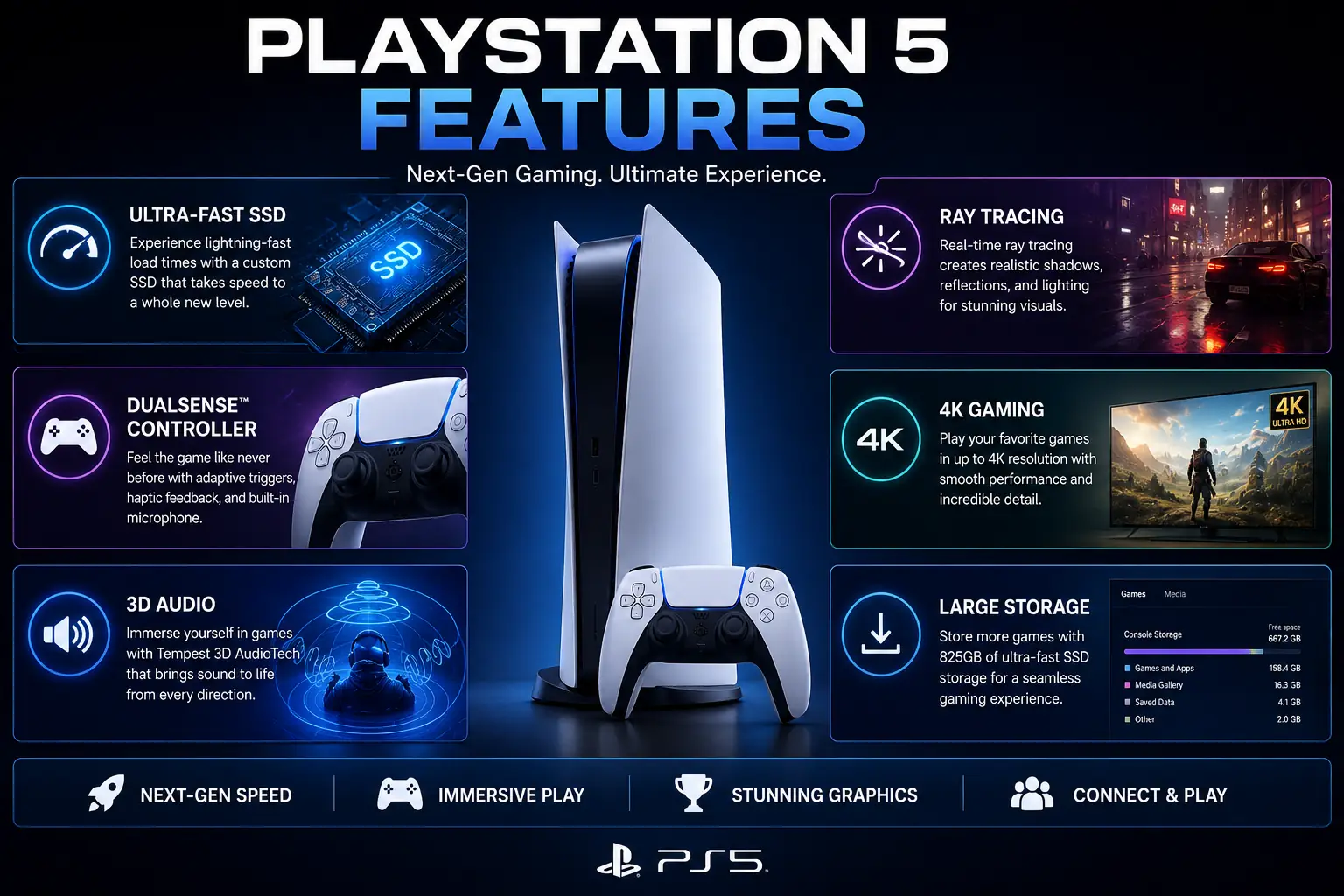
In addition, the PlayStation 5 introduces powerful features such as an ultra-fast SSD, realistic ray tracing, 3D audio, and the innovative DualSense wireless controller. As a result, games feel more responsive, visually impressive, and engaging than ever before.
Whether you’re purchasing your first gaming console or upgrading from a PlayStation 4, this comprehensive guide will help you understand everything you need to know about the PlayStation 5. Furthermore, you’ll discover its key features, hardware specifications, setup process, accessories, and useful tips to help you get the best possible gaming experience from day one.
Overview
If you’re new to gaming, learning about the PlayStation 5 is much easier than you might expect. Although the console includes many advanced features, understanding its basics doesn’t take long. Therefore, this beginner-friendly guide is designed to explain everything in a simple and easy-to-follow way.
In this guide, you’ll learn about:
- PlayStation 5 features
- PS5 Standard vs Digital Edition
- Hardware specifications
- Gaming performance
- Storage options and upgrades
- Essential PS5 accessories
- Console setup process
- Tips for new users
- Common PlayStation 5 problems and solutions
Furthermore, you’ll discover which PlayStation 5 edition best matches your gaming style and budget. In addition, we’ll cover useful setup tips, recommended accessories, and practical advice to help you get the most out of your console. As a result, you’ll have all the information you need to decide whether the PlayStation 5 is the right gaming console for you.
Table Briefing Section
| Section | Details |
|---|---|
| PlayStation 5 Overview | Introduction to the console |
| PS5 Comparison | Standard vs Digital Edition |
| Features | Hardware and gaming capabilities |
| Specifications | CPU, GPU, RAM, and storage |
| Setup Guide | First-time installation |
| Best Games | Popular PS5 titles |
| Accessories | Useful PS5 accessories |
| Beginner Tips | Improve your gaming experience |
| FAQs | Common questions |
| Conclusion | Final recommendation |
PlayStation 5 Comparison
Before buying a PlayStation 5, it’s helpful to compare the available editions.
| Feature | PS5 Standard | PS5 Digital Edition |
|---|---|---|
| Disc Drive | ✅ Yes | ❌ No |
| Digital Downloads | ✅ Yes | ✅ Yes |
| Physical Game Discs | ✅ Yes | ❌ No |
| Blu-ray Movies | ✅ Yes | ❌ No |
| Performance | Same | Same |
| Storage | 825 GB SSD | 825 GB SSD |
| Best For | Mixed physical & digital gamers | Digital-only gamers |
Although both versions offer identical performance, the main difference is the built-in Ultra HD Blu-ray disc drive.
What Is PlayStation 5?
Understanding the PlayStation 5
The PlayStation 5 is Sony’s ninth-generation gaming console, released as the successor to the PlayStation 4.
It combines powerful hardware with modern gaming technology to deliver smooth gameplay, faster loading times, realistic lighting, and immersive audio.
Moreover, the PS5 supports thousands of games, including many PS4 titles through backward compatibility.
Consequently, existing PlayStation users can continue enjoying many of their favorite games while benefiting from improved performance.
Why Is the PlayStation 5 So Popular?
The PlayStation 5 has quickly become one of the world’s most popular gaming consoles, and it’s easy to see why. Compared to previous PlayStation models, the PS5 delivers faster performance, stunning graphics, and a smoother overall gaming experience.
First, its ultra-fast custom SSD significantly reduces loading times, allowing players to jump into games within seconds. As a result, gamers spend less time waiting and more time playing.
Moreover, the innovative DualSense wireless controller introduces adaptive triggers and advanced haptic feedback, making every action feel more realistic and immersive. Whether you’re driving a racing car or drawing a bow in an adventure game, the controller responds differently depending on the gameplay.
In addition, the PS5 supports advanced technologies such as ray tracing, 4K gaming, and Tempest 3D Audio, which together create more lifelike visuals and immersive sound. Consequently, players enjoy a next-generation gaming experience that feels both realistic and engaging.
Furthermore, Sony continues to release highly acclaimed exclusive titles, including Marvel’s Spider-Man 2, God of War Ragnarök, Horizon Forbidden West, and many other blockbuster games. These exclusives give the PlayStation 5 a significant advantage for gamers who enjoy story-driven adventures.
Ultimately, the combination of powerful hardware, innovative features, and an outstanding game library has made the PlayStation 5 one of the most sought-after gaming consoles in the world.
Who Should Buy a PlayStation 5?
The PlayStation 5 is designed for a wide range of players, making it an excellent choice regardless of your gaming experience. Whether you’re completely new to gaming or upgrading from an older console, the PS5 offers features that suit different types of users.
The PlayStation 5 is ideal for:
- First-time console buyers
- Casual gamers
- Competitive online players
- Action and adventure game fans
- Sports game enthusiasts
- Racing game lovers
- Content creators and streamers
- Families looking for home entertainment
Moreover, the console supports both single-player adventures and online multiplayer games, allowing players to enjoy different gaming styles. In addition, backward compatibility with many PS4 titles gives existing PlayStation users access to a large game library from day one.
As a result, the PlayStation 5 provides excellent value for both occasional gamers and dedicated enthusiasts. Therefore, if you’re looking for a powerful, future-ready gaming console with impressive performance and a diverse collection of games, the PS5 is an excellent investment.
PlayStation 5 Specifications
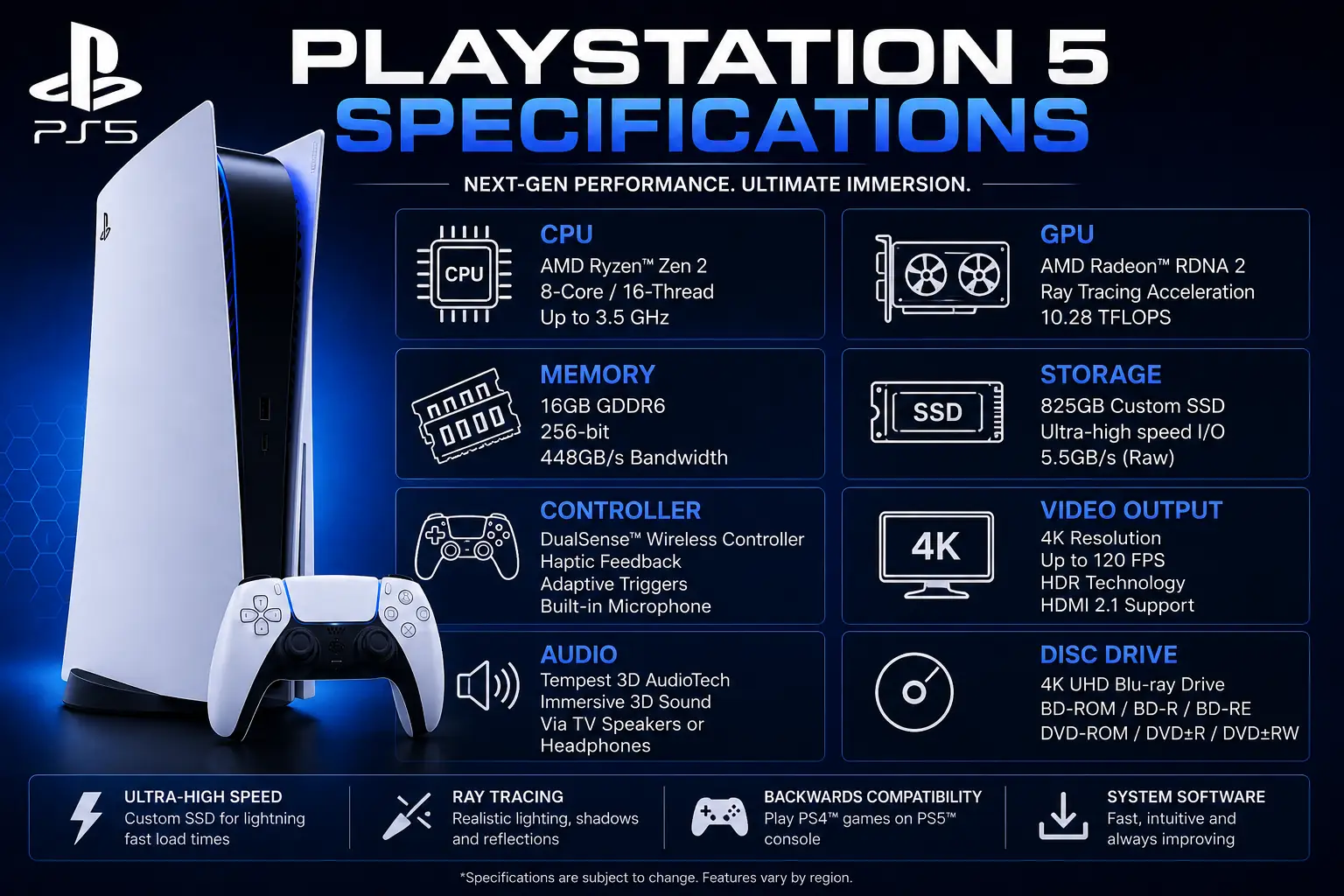
Before buying a PlayStation 5, it’s important to understand its hardware specifications. Although technical details may seem confusing at first, they help explain why the PS5 delivers faster loading times, smoother gameplay, and better graphics than previous PlayStation consoles.
Moreover, Sony designed the PS5 with modern gaming in mind, allowing players to enjoy demanding games without sacrificing performance.
| Specification | PlayStation 5 |
|---|---|
| CPU | 8-Core AMD Zen 2 |
| GPU | AMD RDNA 2 |
| RAM | 16 GB GDDR6 |
| Storage | 825 GB Custom SSD |
| Video Output | Up to 4K 120Hz and 8K Support |
| Audio | Tempest 3D AudioTech |
| Optical Drive | Ultra HD Blu-ray (Standard Edition) |
As a result, the PS5 provides excellent performance for both single-player and multiplayer games.
PlayStation 5 Standard vs Digital Edition
Choosing between the two PlayStation 5 models can be confusing, especially if you’re buying your first gaming console. Although both versions offer the same hardware, graphics performance, and gaming experience, they differ in how you purchase and play games. Therefore, understanding these differences will help you choose the edition that best matches your budget and gaming preferences.
PlayStation 5 Standard Edition
The PlayStation 5 Standard Edition includes an Ultra HD Blu-ray disc drive, allowing you to play both physical and digital games. As a result, it offers greater flexibility than the Digital Edition.
With this version, you can:
- Buy physical game discs
- Watch Ultra HD Blu-ray movies
- Purchase second-hand games
- Trade or sell games after completing them
- Borrow games from friends or family
Moreover, physical game discs are often available at discounted prices, making it possible to save money over time. Consequently, the Standard Edition is an excellent choice for players who enjoy building a physical game collection.
PlayStation 5 Digital Edition
Unlike the Standard Edition, the PlayStation 5 Digital Edition does not include a disc drive. Instead, all games, downloadable content, and movies must be purchased through the PlayStation Store.
Although both consoles deliver identical performance, graphics quality, and loading speeds, the Digital Edition is generally more affordable. Furthermore, its slimmer design appeals to users who prefer a cleaner entertainment setup.
Therefore, this version is ideal for gamers who purchase digital games exclusively and do not need physical discs.
Which PlayStation 5 Edition Should You Buy?
The best PlayStation 5 edition depends entirely on how you prefer to play games.
Choose the Standard Edition if you:
- Prefer physical game discs
- Watch Blu-ray movies
- Buy second-hand games
- Like collecting game cases
- Want maximum flexibility
On the other hand, choose the Digital Edition if you:
- Purchase games online only
- Prefer digital downloads
- Want to spend less initially
- Do not need a Blu-ray drive
Ultimately, both consoles offer the same gaming experience. Therefore, your decision should depend on your gaming habits rather than performance.
How to Set Up PlayStation 5
Setting up a PlayStation 5 is a straightforward process that usually takes only a few minutes. Once everything is connected correctly, you’ll be ready to download games and start playing almost immediately.
Unbox the PlayStation 5
When opening the package, make sure all accessories are included before beginning the setup process.
Inside the box, you’ll typically find:
- PlayStation 5 console
- DualSense Wireless Controller
- HDMI cable
- Power cable
- USB charging cable
- Console stand
- User guide
Furthermore, checking every item before installation ensures nothing is missing.
Connect the PlayStation 5 to Your TV
After unpacking the console, connect it using the supplied accessories.
Simply follow these steps:
- Connect the HDMI cable to your television or monitor.
- Plug the power cable into the console.
- Connect the DualSense controller using the USB cable.
- Turn on your TV.
- Press the power button on the PS5.
Afterward, follow the on-screen instructions to complete the initial setup. As a result, your console will be ready for use within a few minutes.
Connect to the Internet
Connecting your PlayStation 5 to the internet unlocks online gaming, software updates, cloud saves, and access to the PlayStation Store.
You can choose either:
- Wi-Fi
- Ethernet cable
Although Wi-Fi is convenient for most households, a wired Ethernet connection generally provides faster download speeds and a more stable online gaming experience.
Create a PlayStation Network (PSN) Account
Why You Need a PSN Account
A PlayStation Network (PSN) account is essential for enjoying the full PlayStation experience.
Once your account is created, you’ll be able to:
- Download digital games
- Play online multiplayer
- Save game progress to the cloud
- Purchase content from the PlayStation Store
- Subscribe to PlayStation Plus
- Receive software updates
Therefore, creating a PSN account should be one of the first steps after setting up your console.
Sign In or Create a New Account
If you already have a PlayStation account, simply sign in using your existing credentials.
Otherwise, select Create Account and enter your:
- Email address
- Password
- Country or region
- Date of birth
Finally, verify your email address to activate the account and gain full access to PlayStation services.
Update Your PlayStation 5
Why Software Updates Matter
Sony regularly releases system updates to improve the PlayStation 5.
These updates often include:
- Security improvements
- Performance enhancements
- Bug fixes
- New features
- Stability improvements
Therefore, keeping your console updated helps ensure the best possible gaming experience.
How to Update the PlayStation 5
Checking for updates is quick and easy.
Navigate to:
Settings → System → System Software → System Software Update
If an update is available, download and install it.
Furthermore, enabling automatic updates ensures your console always runs the latest software without requiring manual checks.
Common PlayStation 5 Problems
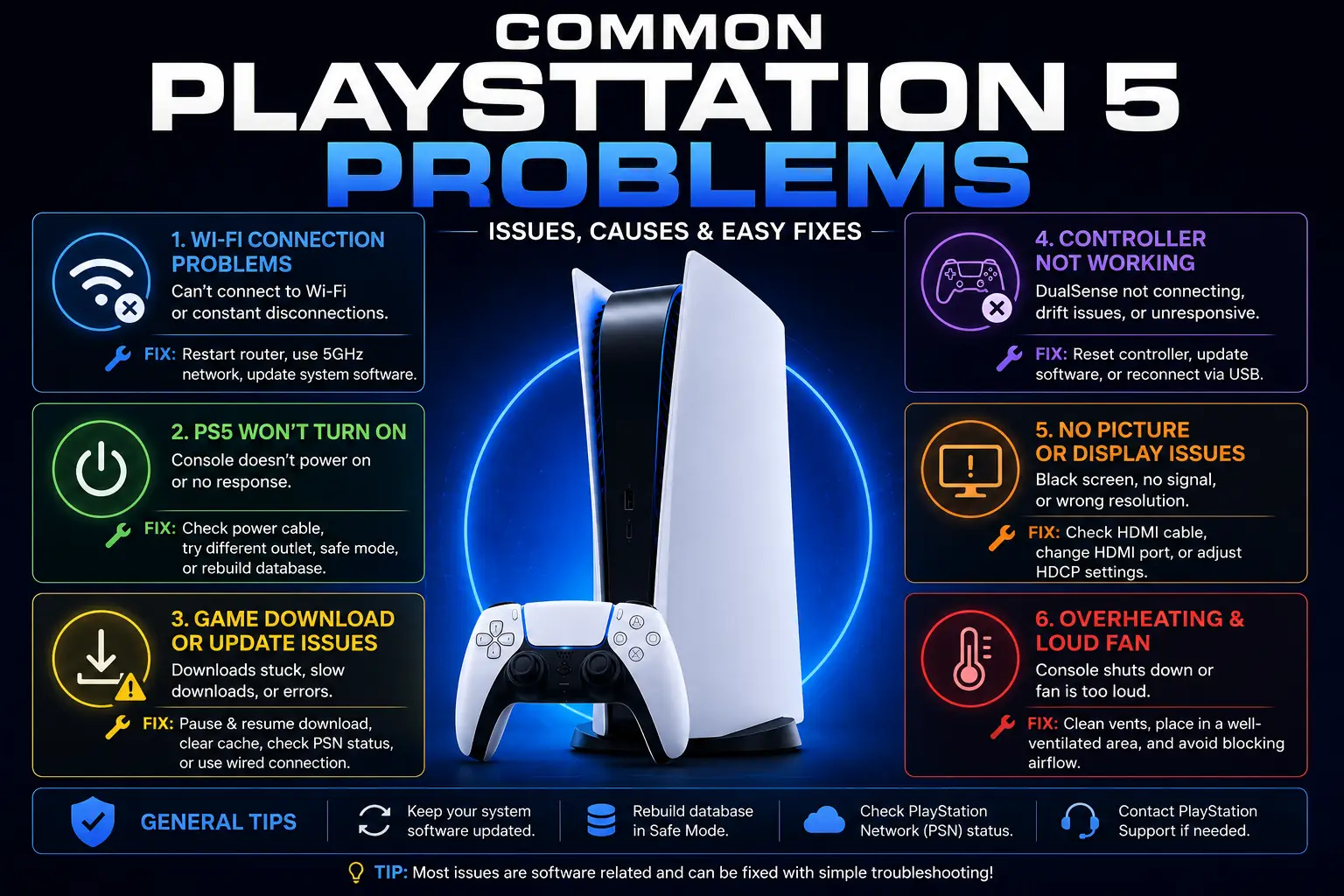
Although the PlayStation 5 is a reliable gaming console, users may occasionally encounter technical issues. Fortunately, most problems can be solved without professional repair.
PlayStation 5 Overheating
Overheating usually occurs when airflow around the console is blocked.
To prevent this:
- Place the console in an open area.
- Clean air vents regularly.
- Avoid enclosed cabinets.
- Keep dust away from cooling vents.
Consequently, the cooling system can operate efficiently.
Slow Game Downloads
If downloads are taking too long:
- Restart your router.
- Use an Ethernet connection.
- Pause other downloads.
- Install the latest system update.
Furthermore, downloading games during off-peak hours may improve speeds.
Storage Full
Modern PS5 games require significant storage space.
Therefore:
- Delete games you no longer play.
- Remove unnecessary media files.
- Install an internal NVMe SSD.
As a result, you’ll have enough space for future game installations.
DualSense Controller Issues
Sometimes the controller may disconnect or respond incorrectly.
Fortunately, most issues can be resolved by:
- Updating controller firmware.
- Reconnecting via USB.
- Resetting the controller.
- Fully charging the battery.
Consequently, controller performance usually returns to normal.
Tips for New PlayStation 5 Users
If you’ve recently purchased a PlayStation 5, these simple tips will help you enjoy a better gaming experience.
Keep Your Console Updated
Always install the latest system software.
Moreover, updates improve security, stability, and overall performance.
Manage Storage Regularly
Instead of waiting until storage is full, delete unused games periodically.
As a result, your console remains organized and performs efficiently.
Enable Automatic Game Updates
Automatic updates ensure your games remain compatible with the latest system software.
Furthermore, you’ll spend less time waiting before playing.
Use Rest Mode
Rest Mode allows your PS5 to:
- Charge controllers
- Download updates
- Resume games quickly
Therefore, it improves convenience while reducing waiting times.
Frequently Asked Questions
Is the PlayStation 5 Worth Buying?
Yes. The PlayStation 5 offers excellent performance, fast loading speeds, impressive graphics, and a growing library of exclusive games. Therefore, it remains one of the best gaming consoles available today.
Can the PlayStation 5 Play PS4 Games?
Yes. Most PlayStation 4 games are compatible with the PS5 through backward compatibility.
Consequently, existing PlayStation users can continue enjoying many of their favorite titles.
Does the PlayStation 5 Support 8K Gaming?
The console supports 8K output for compatible displays. However, most current games are optimized for 4K gaming.
Can I Expand PlayStation 5 Storage?
Yes. Compatible M.2 NVMe SSDs allow you to increase internal storage while maintaining high-speed performance.
Which PlayStation 5 Edition Is Better?
If you prefer physical discs, choose the Standard Edition.
However, if you buy games digitally, the Digital Edition offers the same performance at a lower price.
Conclusion
The PlayStation 5 is one of the most powerful gaming consoles available today. With its ultra-fast SSD, realistic graphics, DualSense controller, and extensive game library, it delivers an outstanding gaming experience for beginners and experienced players alike.
Moreover, choosing the right edition, keeping the console updated, and managing storage effectively will help you get the most from your investment. Whether you enjoy action, sports, racing, or multiplayer games, the PS5 provides something for every type of gamer.
Ultimately, if you’re looking for a modern gaming console with impressive performance, advanced features, and long-term value, the PlayStation 5 is an excellent choice.
Related Articles
- SSD vs HDD: Which Storage Option Is Right for You?
- How to Use FL Studio for Beginners: Step-by-Step Guide
- How to Connect Mobile Screen to TV: Easy Step-by-Step Guide
- Mobile Battery Health Guide: How to Extend Battery Life
- Top WhatsApp Hidden Features Most Users Never Use
Helpful Resources
- PlayStation Official Website
- PlayStation Support
- PlayStation Store
- PlayStation Plus
- PlayStation Blog
Disclaimer
This guide is for informational purposes only. PlayStation 5 features, accessories, software updates, and subscription plans may change over time. Always refer to Sony’s official PlayStation website for the latest product information, compatibility details, and support resources.

Gul Fahad is the founder of Readsinfo and a content creator focused on Artificial Intelligence, Technology, Online Earning, and Education. He shares practical guides, digital learning resources, and real-world insights to help readers develop valuable skills and stay updated with modern trends.



@hamza944
I’ll be win this ps5
I’m applying on 6 July at 3:14 AM
PS5 🫠🤌🏻
Muhammad Subhan Jamshaid
03235312793
sxbhan99 ( Instagram)
[email protected]
Date: 05-07-2026 🙃
Lahore
saad.exe.__ Instagram ID
[email protected]
6/july/2026
Sir main dikhan sy hun or mujhy is ki zaroorat hai agy ap ki marzi sir
03479734169
Instagram: https://www.instagram.com/sunair_270?igsh=dzRpNGNsODcxdHdl
Email: “[email protected]”
TikTok id: zainulabideenk85
City: Mandi Bahauddin
Date: 6July2026
Instagram Uzairr.r911
Tiktok Eren_6_9_
Apply date 6/7/26
Anxious to get that ps 5 from sargodha
abdulrehman1_2_
usman.rafique08
Please give me the PS5 this is my dream ❤️
Tiktok ID Hamzaeditz475.
Email ID [email protected].
Whatsapp no 03104817097
Date . Mon 6 July 2026
Mesak
Ig @Hunayn.coree
tk @rao_hunain18
sc @hunayngotchill
Date:6/July/2026
What’s app no:03490549501
I will win inshallah From Ahmedpur East TikTok 16 @muhammadabdullah20111
16july-2026
My name: Roshan
City: chichawatni
Insta id: ibneisrar5
[email protected]
Lahore
06-jul-2026
My name is Abdul Hanan I am from Lahore and I see your videos your content is so interesting and knowledgeable
My insta I’d who.is__nanuu
6 July 2026
Monday
Insta id cm_hyper11
Email [email protected]
Participate apply date 6 July
Name Muhammad Ali
Karachi
Date 6th july
I need ps5 it is my dream and I want it and it will be mine inshallah
Date: 6th july
I’m watching Waleed Malik so I comment on 6th July
3 july
Abbottabad
Ha_iderrr
Ps5
Date: July 06 2026
Name: WALEED ALI HASHMI
CITY : DERA GHAZI KHAN
INSTA I’D: https://www.instagram.com/wali53725?igsh=bWFuNHJnZDZhaGgy
City: Gujranwala
[email protected]
Rawalpindi
5_july_2026
Tiktok id: x_malik012
https://www.instagram.com/i_bra_him_7?igsh=MTM1bjBybHdjMHU4Yw==
Date 6 July
City bahawalpur
Rahim yar khan
Date : 6 july 2026
[email protected]
My tik tok I’d[ZOUNI]and gmail is [email protected] plz give me psf because it’s my dreem but I’m poor not to purchase psf plz Allah apki hiffazat farmyen Ameen
Instagram id @_hassanplayz and @kirozeny
TikTok Id @93fps
Date 6-7-2026
phone no 0309-7275180
City
Arifwala
Date
6 july 2026
[email protected]
Lahore, Pakistan
I am the 1st one please I need the money.
[email protected]
[email protected]
Lahore, Pakistan
[email protected]
Lahore, Pakistan
MY Instagram ID : @syedfareed_hamdani
rohaan__tariq instagram
City : Gojra Toba tek singh
Date-6/7/26
muhammad_umair.2
03705664865.
Insta:(adilkhanjhelum)
City: Jhelum
Date: 07 jul 2026
I LOVE PS5 BUT I CANT AFFORD THIS THIS IS A GOOD NEW FOR ME I WISH I WIN THIS PS5 IF IAM LUCKY I WON THIS
Muhammad Abdul Rehman Jamil
07-07-2026
Taxila, Rawalpindi
[email protected]
(_z2xvt Instagram I’d )
I love PS5 but I can’t afford this it’s to expensive I wish I won this i love ps5
I love PS5 but I can’t afford this it’s to expensive I wish I won this if I am lucky
Waleed bhai, aapka PS5 giveaway bohot amazing hai! Dil se thank you for giving us this opportunity. Main ne poori tarah se participate kiya hai aur umeed karta hoon ke shayad is baar luck mere saath ho. Bohot excited hoon! ❤️
SUBAH PUNJAB
CITY RAHIM YAR KHAN
Contact’s
Gmail [email protected]
TikTok @flexy..x..momstealer
PS5 apply date: 07 July 2026
vill/PO Jhungal tehile gujar khan distt. Rawalpindi
Haider sherazi
Date: 7 July 2026
haidersherazi807@gmail.
Abdullah_bohar
Great breakdown of the PS5 specs! It’s interesting to see how the custom SSD, powerful GPU, and advanced architecture work together to improve loading times, graphics quality, and overall gaming experience. The explanation makes the technology much easier to understand for both gamers and tech enthusiasts.
Insta id: husnain1kayani
City islamabad
Ps5
Aliraza
Burewala
Email:[email protected]
03198842020
@MIRZA.ALI.1 INSTAGRAM
Eqan haider
From Sargodha
Insta Id ashhad0016
Whatsap number 03294202573
islamicdeen69 my tik tok id
Name: Muhammad Afzaal Arshad
City: Chunian
Contact Tiktok: muhammad.afzaal.ar
Heyyy .. I want the PS5 For Gta VI
I’ll be win this ps5 InshAllah
[email protected]
Karachi
Instagram account: mian._.irfan1
Gmail: [email protected]
mera bohet bara khuwab h k me gta 5 kheloo lakin agr mujeh ap ps5 de de ge tu me gta 6 khel sakoo ga plzzzzzzz
Happy for ps5
Imagine ps5 controller in your hand
Name subhan
City
rawalpindi tench bata
Number.
03365832519
Insta I’d
subhan_x_jod
Instagram id zainqazi_15
City: Lahore
https://www.facebook.com/share/18sjKd87SM/
https://www.instagram.com/emaduddin_muhammad?igsh=eWg4bGp2YTh4YmI1
Muhammad Emaduddin
Karachi, Pakistan
[email protected]
07 July 2026 (Wednesday)
Name:qaiser
Address:skardu
Contact:03495138577
Instagram account:@czr_018
n_m_o_i_7_a_t_
City:Lahore
Insta id:n_o_m_i_7_a_t_
City:Lahore
Insta I’d:n_o_m_i_7_a_t_
Muga chaiya ha play station mana follow keya Howa Instagram or app ko Malik Walid
My watsapp number 03318298217
My tiktok account rawedits44 and shani.am i will wait for your response ❤️🩹🔥💓
I AM VERY CONFIDANT FOR WIN PS5 ITS MY FAVERET BUT ITS OUT OF RANG
https://www.facebook.com/share/18sjKd87SM/
https://www.instagram.com/emaduddin_muhammad?igsh=eWg4bGp2YTh4YmI1
Muhammad Emaduddin
Karachi, Pakistan
[email protected]
10 July 2026 (Friday)
City. Rawalpindi
Date. 10 July 2026
Contact. 03349178214
[email protected]
City. rawalpindi tench bata
Contact. 03349178214
Date. 10 July 2026
Email address. [email protected]
Qamber Ali
Qamberali404 instagram
03244377137 whatsapp
https://www.facebook.com/share/18sjKd87SM/
https://www.instagram.com/emaduddin_muhammad?igsh=eWg4bGp2YTh4YmI1
Muhammad Emaduddin
Karachi, Pakistan
[email protected]
11 July 2026 (Saturday)
I will win this ps5
Subhan Sami
Wa: 03247449266
Instagram : jaxanzaib
11 July, 2026
date : 10july 2026. ps5
tiktok I’d:https://vm.tiktok.com/ZS9MxLVL9m7as-dHExk/
https://www.facebook.com/share/18sjKd87SM/
https://www.instagram.com/emaduddin_muhammad?igsh=eWg4bGp2YTh4YmI1
Muhammad Emaduddin
Karachi, Pakistan
[email protected]
12 July 2026 (Sunday)
Nankana sahib | 7-july 2026
insta : unknownhuman_12358
Anwer Ahmed
Hyderabad Pakistan
insta id : zoexx_26
Ahad Ali
https://www.instagram.com/ahad_ale110?igsh=MXcxZXZna2YxMmp1cg==
Gilgit baltistan pakistan
Shayan Arshad
Karachi Pakistan
Insta I’d shayan_the_roaster
KHUZAIMA SAQIB
Wa: 03354570701
KHUZAIMA SAQIB
LAHORE
03354570701
wt
I win this ps5 InshAllah
Name:usmanghani
Address::kpk haripur hazara darwesh
Contact:mrusmanm__8 Tiktok
Thanks 👍 for giveaway
wt
[email protected]
House no 325/10 block Ee Citi housing Gujranwala
03106973794
wt
Muhammad Ahmad
325/10 Block Ee Citi housing Gujranwala
wt
https://www.facebook.com/share/18sjKd87SM/
https://www.instagram.com/emaduddin_muhammad?igsh=eWg4bGp2YTh4YmI1
Muhammad Emaduddin
Karachi, Pakistan
[email protected]
14 July 2026 (Tuesday)
wt
My Name: usmanghani
Address::kpk haripur hazara darwesh
Contact::mrusmanm__8 Tiktok
Thanks
For giveaway 😁
w8
I’ll be win ps5 InshAllah
wt
Hamid Saeed
Muridke
17-july-2026
Contact at Instagram: r_hamid001
Need PS5
https://www.facebook.com/share/18sjKd87SM/
https://www.instagram.com/emaduddin_muhammad?igsh=eWg4bGp2YTh4YmI1
Muhammad Emaduddin
Karachi, Pakistan
[email protected]
17 July 2026 (Friday)
https://www.facebook.com/share/18sjKd87SM/
https://www.instagram.com/emaduddin_muhammad?igsh=eWg4bGp2YTh4YmI1
Muhammad Emaduddin
Karachi, Pakistan
[email protected]
19 July 2026 (Sunday)
[email protected]
[email protected]
Lahore
20 july
https://www.facebook.com/share/18sjKd87SM/
https://www.instagram.com/emaduddin_muhammad?igsh=eWg4bGp2YTh4YmI1
Muhammad Emaduddin
Karachi, Pakistan
[email protected]
20 July 2026 (Monday)
https://www.facebook.com/share/18sjKd87SM/
https://www.instagram.com/emaduddin_muhammad?igsh=eWg4bGp2YTh4YmI1
Muhammad Emaduddin
Karachi, Pakistan
[email protected]
21 July 2026 (Tuesday)
https://www.facebook.com/share/18sjKd87SM/
https://www.instagram.com/emaduddin_muhammad?igsh=eWg4bGp2YTh4YmI1
Muhammad Emaduddin
Karachi, Pakistan
[email protected]
22 July 2026 (Wednesday)
https://www.facebook.com/share/18sjKd87SM/
https://www.instagram.com/emaduddin_muhammad?igsh=eWg4bGp2YTh4YmI1
Muhammad Emaduddin
Karachi, Pakistan
[email protected]
24 July 2026 (Friday)
https://www.facebook.com/share/18sjKd87SM/
https://www.instagram.com/emaduddin_muhammad?igsh=eWg4bGp2YTh4YmI1
Muhammad Emaduddin
Karachi, Pakistan
[email protected]
26 July 2026 (Sunday)
Hoor fatima
Gmail: [email protected]
City: multan
https://www.facebook.com/share/18sjKd87SM/
https://www.instagram.com/emaduddin_muhammad?igsh=eWg4bGp2YTh4YmI1
Muhammad Emaduddin
Karachi, Pakistan
[email protected]
27 July 2026 (Monday)
https://www.facebook.com/share/18sjKd87SM/
https://www.instagram.com/emaduddin_muhammad?igsh=eWg4bGp2YTh4YmI1
Muhammad Emaduddin
Karachi, Pakistan
[email protected]
28 July 2026 (Tuesday)
Inshallah waleed kashmiri will win the ps5
Name :waleed malik
Add : Bhimber Azad kashmir
Insta id : its__jimmy_80
Gmail : [email protected]
Quetta
28-07-2026
Instagram : arvon_58
https://www.facebook.com/share/18sjKd87SM/
https://www.instagram.com/emaduddin_muhammad?igsh=eWg4bGp2YTh4YmI1
Muhammad Emaduddin
Karachi, Pakistan
[email protected]
29 July 2026 (Wednesday)
Muhammad Hamza
City: Wah Cantt
Way of Contact: [email protected] or
Itz_hamza_922
https://www.facebook.com/share/18sjKd87SM/
https://www.instagram.com/emaduddin_muhammad?igsh=eWg4bGp2YTh4YmI1
Muhammad Emaduddin
Karachi, Pakistan
[email protected]
30 July 2026 (Thursday)
https://www.facebook.com/share/18sjKd87SM/
https://www.instagram.com/emaduddin_muhammad?igsh=eWg4bGp2YTh4YmI1
Muhammad Emaduddin
Karachi, Pakistan
[email protected]
31 July 2026 (Friday)
7th August,2026
Amad ud din From Islamabad
Email: [email protected]
contact no: 03105792916
Good read! Sharing MiniMax H3 Video Generator (/) — handy for 4–15s cinematic clips. MiniMax H3 Video Generator